Path tool for Sunlit Night

During development on Sunlit Night, I worked on a custom path tool to support enemy movement in a way that was both designer-friendly and constrained to the needs of the game.
The project uses grid-based navigation, and we wanted enemies to patrol along clearly defined routes. Rather than hard-coding movement logic per enemy or manually placing waypoint objects throughout the scene, I built a reusable Path component that allows designers to define and edit patrol routes directly in the editor.
Core Design
The tool is centered around a Path script that stores and manages a list of control points. These points define the route an enemy will follow. The system is intentionally simple:
A path is just an ordered list of waypoints.
Enemies reference a Path and iterate through its points.
Direction can be reversed without modifying the point order manually.
This keeps the runtime logic straightforward while pushing most of the complexity into editor tooling.
When a Path component is added to an empty object, control points can be created directly from the inspector. The first point defaults to the object’s transform (with y = 0 to maintain grid alignment). Additional points are appended sequentially, ensuring predictable ordering.
Editor Tooling
The majority of the work on this feature was focused on editor usability rather than runtime behavior.
Custom inspector controls allow designers to:
Add and remove waypoints.
Reverse the path direction.
Adjust visual settings such as point color, line color, error color, and point size.
The error coloring was added specifically to highlight diagonal connections. Since completed paths should not contain diagonals, visually flagging them helps catch layout mistakes early without requiring additional validation passes.

Inspector GUI
In the Scene view, the tool supports direct manipulation:
Click and drag points to reposition them.
Shift-click to delete a point.
Ctrl-click to define the start point.
Drag a line segment to insert a new point between two existing ones.
This workflow avoids constantly switching between the inspector and hierarchy, allowing paths to be shaped visually and iteratively.
Multi-object editing is also supported. Selecting multiple paths allows them to be viewed and edited simultaneously in the Scene window. This helps by enabling comparison and alignment between routes and allows the user to quickly edit all paths without needing to individually select each object.
Undo functionality was also kept in mind and carefully implemented into the GUI and scene editor allowing for complete and bug free undos and redos.
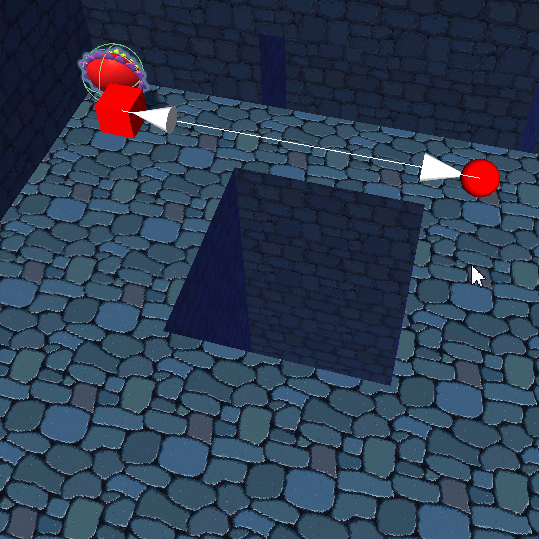
Example use of tool in the scene view.
Start point changing, point deletion/addition/movement, diagonal error coloring are shown in the gif.
Runtime Usage
At runtime, usage is intentionally minimal. An enemy prefab simply receives a reference to a Path. The enemy script then reads the ordered control points and moves along them.
Because the Path tool enforces ordering and discourages invalid configurations at edit time, the movement code does not need to account for many edge cases. The goal was to reduce runtime branching by catching mistakes during level design instead.
Design Philosophy
This tool was less about complex algorithms and more about improving workflow. The objective was to:
Reduce scene clutter by avoiding loose waypoint objects.
Provide strong visual feedback directly in the editor.
Prevent invalid path configurations before playtesting.
Keep enemy scripts clean and focused on movement rather than path definition.
By building the system as an editor-focused utility, we were able to give designers flexibility without increasing runtime complexity. The result is a small but highly practical tool that streamlined patrol setup across the project.
The source code for the path tool and use of the path data by a path follower can be found here.


Comments